
User guide · 5
What a call costs, and where you see it.
Only calls use something that runs out: call minutes. Using the phone's screen, the API, apps, camera and microphone is not counted. A new phone starts with a free 24-hour trial (we only check your card, nothing is charged); plans and minutes are bought in your dashboard.
What counts
Connected time, per started minute.
- Counted: the time a call is
connected, that is, your guest and the persona are in the call. It is rounded up to whole minutes: a call of 25 seconds uses 1 minute, a call of 61 seconds uses 2. - Not counted: waiting for the guest (
ringing), a call nobody joined, a start that was refused, and everything you do with the phone outside calls. - At zero: a running call is cut, and a new one is refused until minutes are added. The phone keeps working.
A real example. The balance before a call:
curl -s -H "X-API-Key: $ERIUS_KEY" $ERIUS_API/minutes{
"tenant": "ca9a4ca3f",
"balance_minutes": 9,
"usable_minutes": 9,
"period_end": "2026-10-26T20:09:39Z",
"unlimited": false,
"expired": false
}After a call that was connected for about half a minute:
curl -s -H "X-API-Key: $ERIUS_KEY" $ERIUS_API/minutes{
"tenant": "ca9a4ca3f",
"balance_minutes": 8,
"usable_minutes": 8,
"period_end": "2026-10-26T20:09:39Z",
"unlimited": false,
"expired": false
}And a call that nobody joined. It was started, stayed ringing for 20 seconds and was hung up. The balance did not change:
sleep 3; curl -s -H "X-API-Key: $ERIUS_KEY" $ERIUS_API/minutes{
"tenant": "ca9a4ca3f",
"balance_minutes": 8,
"usable_minutes": 8,
"period_end": "2026-10-26T20:09:39Z",
"unlimited": false,
"expired": false
}What a new account has
Trial: 24 hours free, calls not included.
That is today's setting for new accounts. It may change; your own numbers are always the ones /minutes and the dashboard show.
- The live demo on the home page is free, no sign-up. Your own phone: 24 hours free (we only check your card, nothing is charged; one free trial per person), then a subscription. The trial does not include call minutes. It is for a phone only, not a tablet.
balance_minutesstarts at 0: calls are not included in the trial.period_endis the end of the trial: 24 hours after the phone was handed out (accounts that signed up before 1 November 2026, Madrid time, keep their 14 days). Minutes that are not used by then expire:expiredbecomestrueandusable_minutesbecomes 0.- The welcome email names the end date of the trial of the phone itself. The trial is free (EUR 0): after you confirm your email we only check your card, nothing is charged, and nothing is charged when the trial ends. One free trial per person. To keep the phone after the trial, it needs a subscription. Any trial phone that is not used for 24 hours in a row (no dashboard, live stream, API or agent calls) is deleted automatically, with all data on it, so the phone can go to the next person in line; we send an email when it happens. Paid plans (subscription or minute packs) are never deleted by this rule.
Where the balance is shown
Three places, one number.
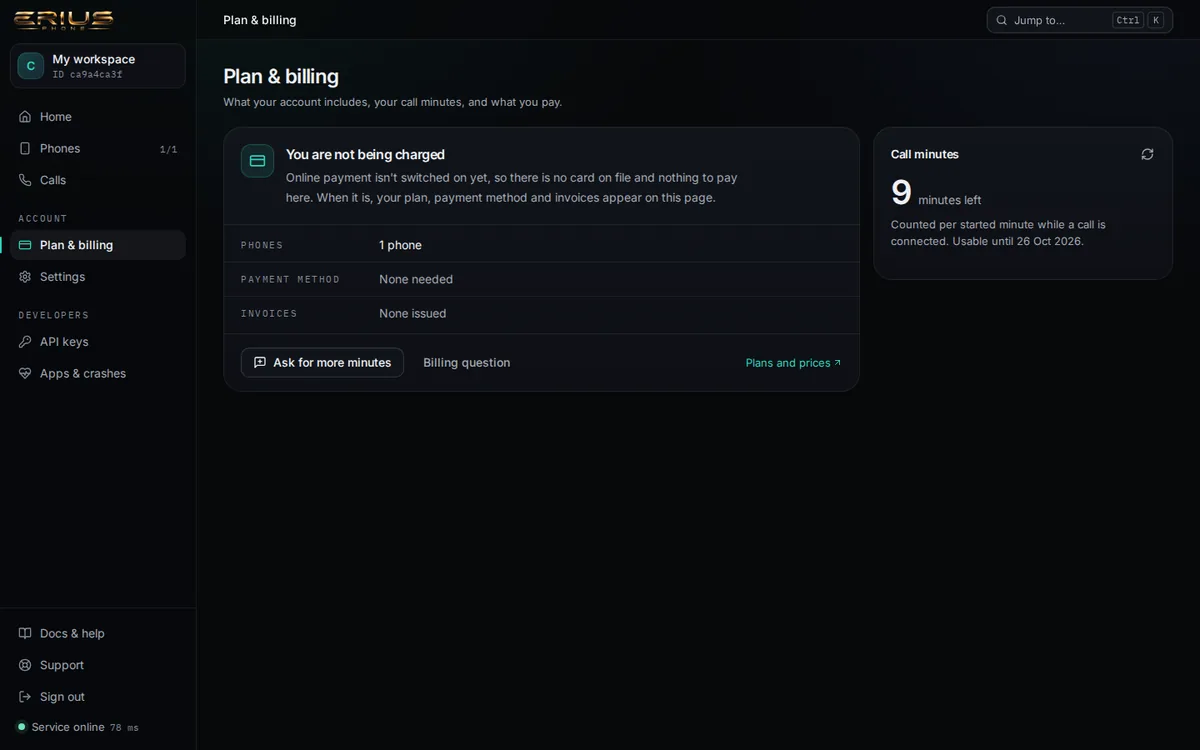
- Dashboard, Home and Calls: "Call minutes", the minutes left and the date they can be used until.
- Dashboard, Plan & billing: the same card, plus what your account includes. While payment is off, the page says "You are not being charged".
- API:
GET /minutes, as above. The fields are explained on the Calls API page.
When the minutes are gone
Calls stop, the phone does not.
The balance at zero:
curl -s -H "X-API-Key: $ERIUS_KEY" $ERIUS_API/minutes{
"tenant": "ca9a4ca3f",
"balance_minutes": 0,
"usable_minutes": 0,
"period_end": "2026-10-26T20:09:39Z",
"unlimited": false,
"expired": false
}A call start is refused with HTTP 402:
curl -s -w "\nHTTP %{http_code}\n" -X POST -H "X-API-Key: $ERIUS_KEY" \
-H "Content-Type: application/json" -d '{"app":"web"}' $ERIUS_API/device/$ERIUS_DEVICE/calls{
"ok": false,
"error": "no_minutes",
"message": "no call minutes left on this account"
}
HTTP 402Everything else still answers as before, for example a screenshot. The dashboard says "Calls can't start until minutes are added. Everything else on your phone keeps working."
How to ask for more
Open a ticket. We add the minutes.
Minutes and plans are bought by card in your dashboard (Plan & billing). We do not send payment links by email.
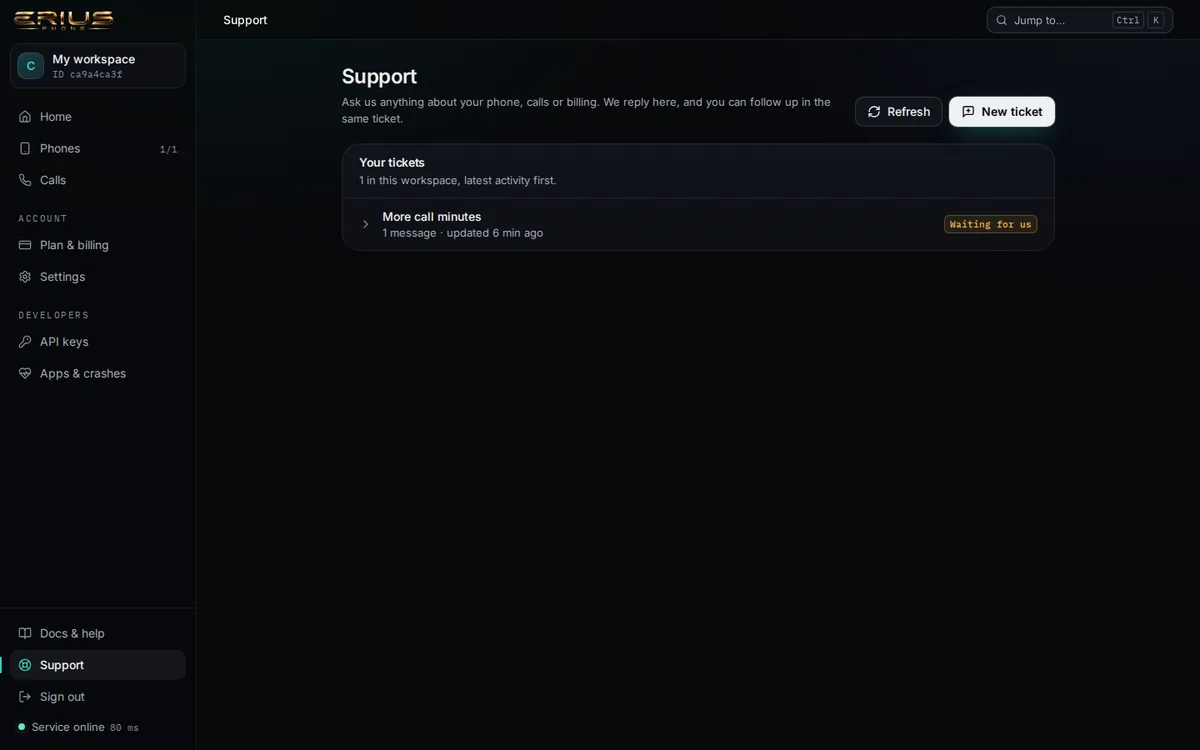
In the dashboard: Plan & billing, then Ask for more minutes. It opens a support ticket with the subject filled in. Say how many minutes you need and what for. We answer in the ticket, and the new balance shows up in the dashboard by itself.
Your agent can open the same ticket:
curl -s -X POST -H "X-API-Key: $ERIUS_KEY" -H "Content-Type: application/json" \
  -d '{"subject":"More call minutes","message":"Please add 60 call minutes to my account."}' \
$ERIUS_API/support/tickets{
"ok": true,
"ticket": {
"id": "ct_73b16cf31403",
"subject": "More call minutes",
"device": null,
"status": "open",
"created": "2026-10-12T20:22:35.974Z",
"updated": "2026-10-12T20:22:35.974Z",
"messages": [
{
"author": "customer",
"body": "Please add 60 call minutes to my account.",
"created": "2026-10-12T20:22:35.974Z"
}
]
}
}Read the answer later with GET /support/tickets. Our reply appears in messages with the author support.
About prices. The pricing page lists the current prices. Phones, call minutes and add-ons are bought in the dashboard (Buy), and the final amount is shown at checkout before you pay. We never charge you for anything you have not agreed to in advance.
Billing questions
Ask in the same place.
For an invoice, a refund or a question about your plan, use Billing question on the Plan & billing page. It opens a ticket as well. If you cannot sign in, write to info@eriusphone.com from the address on your account.
Stuck on something?
Open a ticket from your dashboard and we answer there. No key yet? Write to info@eriusphone.com.
Open a support ticket