
User guide · 2
Use your phone from the browser or over HTTP.
The phone is a full Android system that runs on our servers and keeps its apps and data between sessions. You reach it in two ways: the live screen in the dashboard, and the API your agent calls with the same key.
Screen in the browser
See it and touch it.
Dashboard, Phones, your phone. Nothing to install on Windows, macOS or Linux: any current browser works.
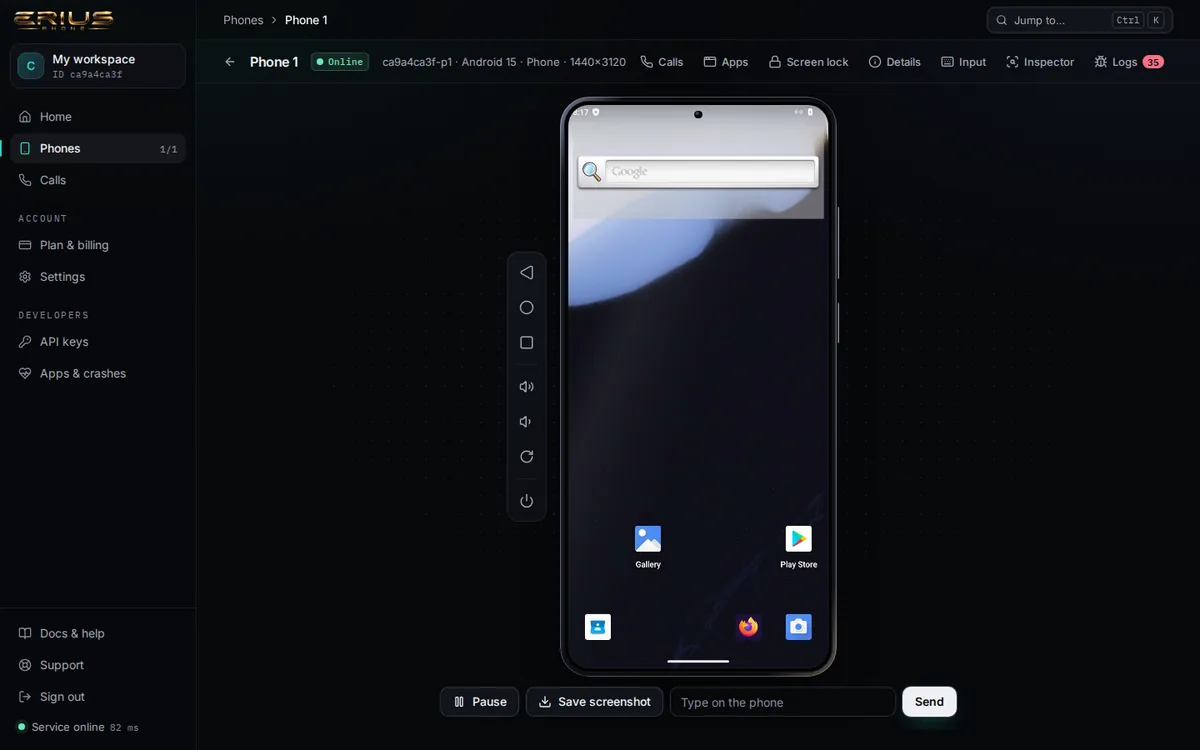
- Click to tap. Drag to swipe. Hold, then release to long-press.
- The keys beside the phone are Back, Home, Recent apps, volume up and down, rotate and power. Power asks before it acts.
- Type on the phone sends text to the field that has focus. The Input panel has Enter, Delete and "open a web page".
- Save screenshot downloads the current picture. Pause stops the live picture without touching the phone.
The same from a terminal:
curl -s -H "X-API-Key: $ERIUS_KEY" -o screen.jpg \
  -w "%{http_code} %{content_type} %{size_download} bytes\n" \
"$ERIUS_API/device/$ERIUS_DEVICE/screenshot?format=jpeg&maxSide=1280"200 image/jpeg 24723 bytesThe format is a request, not a guarantee. Normally you get a JPEG in about 0.3 seconds. For up to 30 seconds after the phone's fast screen reader restarts, the API answers with a full-size PNG instead (about 2 MB, up to 4 seconds). Read the Content-Type of the answer instead of trusting the file name.
Open a web page on the phone and wait until a text is on screen:
curl -s -X POST -H "X-API-Key: $ERIUS_KEY" -H "Content-Type: application/json" \
-d '{"url":"https://example.com"}' $ERIUS_API/device/$ERIUS_DEVICE/launch{
"ok": true,
"component": "org.mozilla.firefox/org.mozilla.fenix.HomeActivity",
"launchState": "COLD",
"totalTimeMs": 1107,
"foreground": {
"package": "org.mozilla.firefox",
"activity": "org.mozilla.fenix.HomeActivity",
"window": "org.mozilla.firefox/org.mozilla.fenix.HomeActivity",
"crashDialog": false,
"crashedPackage": null
}
}curl -s -X POST -H "X-API-Key: $ERIUS_KEY" -H "Content-Type: application/json" \
-d '{"text":"Example Domain","timeout":20000}' $ERIUS_API/device/$ERIUS_DEVICE/wait{
"ok": true,
"snapshot": "- Group\n - WebView \"Example Domain\" ( )\n - View ( )\n - View \"This domain is for use in doc…
}Back to the home screen:
curl -s -X POST -H "X-API-Key: $ERIUS_KEY" -H "Content-Type: application/json" \
-d '{"key":"home"}' $ERIUS_API/device/$ERIUS_DEVICE/press{
"ok": true
}ADB and scrcpy
Not offered today.
We say it plainly, because many Android tools expect it.
A direct ADB connection, and with it scrcpy, Android Studio's device mirror and adb shell, is not available to customers today. The phone's ADB port is bound to the server's loopback address only and is not reachable from the internet. An attempt ends in a timeout:
timeout 30 adb connect api.eriusphone.com:5555 | grep -v daemon; echo "exit code ${PIPESTATUS[0]} (124 = no answer within 30 seconds)"exit code 124 (124 = no answer within 30 seconds)This is the same on Windows, macOS and Linux, and no key or setting on your side changes it. What you use instead:
| You wanted | Use this |
|---|---|
| scrcpy: see and control the screen | The live screen in the dashboard, in any browser |
adb install app.apk | Dashboard, Apps, or POST /device/:id/install (below) |
adb shell input tap, input text, key events | /tap, /type, /press, /swipe in the API reference |
adb shell am start | /launch and /intent |
adb logcat for crashes | Dashboard, Logs, or GET /device/:id/crashes |
adb push and adb pull | Not offered, see Files |
adb shell (a free shell) | Not offered |
If your work needs real ADB, tell us in a support ticket what for. It helps us decide what to build.
Install apps
From an APK, in one step.
In the dashboard: open your phone, Apps, drop the APK. One file can be up to 384 MB, and three uploads can run at once per account.
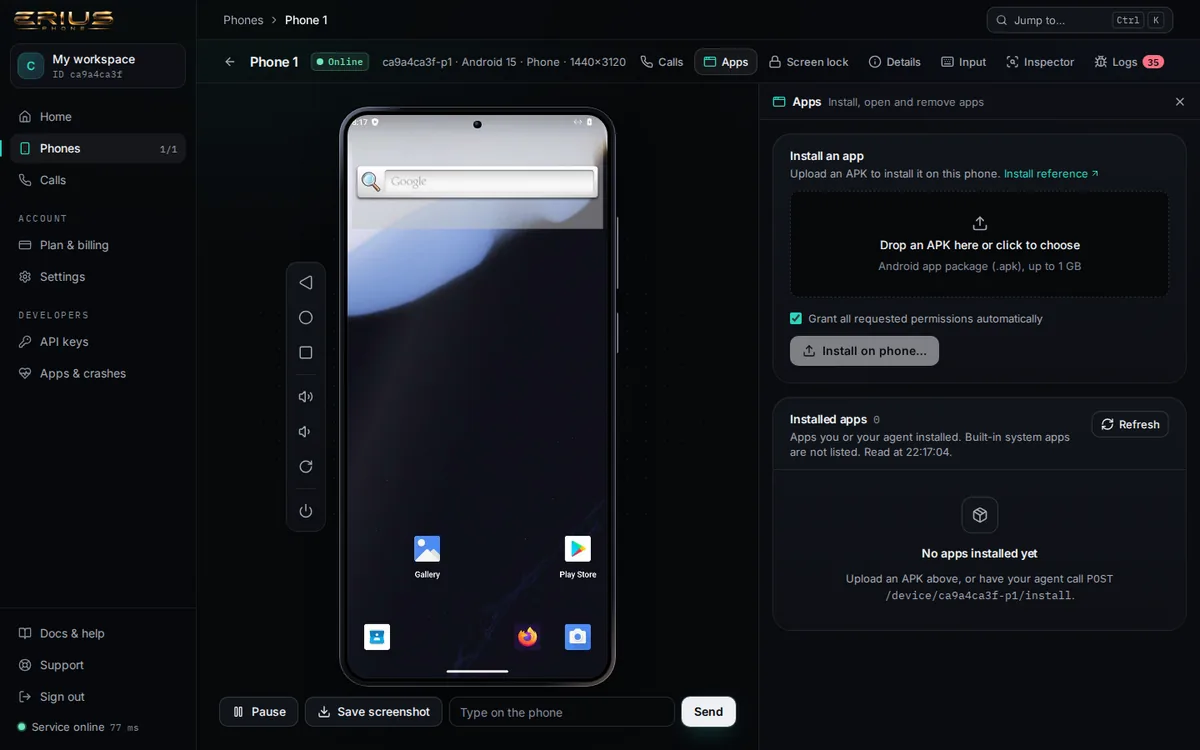
From a terminal. The example installs the open-source camera app Open Camera from a file called app.apk:
curl -s -X POST -H "X-API-Key: $ERIUS_KEY" \
-F apk=@app.apk "$ERIUS_API/device/$ERIUS_DEVICE/install"{
"ok": true,
"device": "ca9a4ca3f-p1",
"package": "net.sourceforge.opencamera",
"versionCode": "96",
"versionName": "1.56.2",
"label": "Open Camera",
"launchActivity": "net.sourceforge.opencamera.MainActivity",
"minSdk": 23,
"targetSdk": 36,
"abis": [],
"adbOutput": "Performing Streamed Install\nSuccess",
…List what you installed, open it, stop it, remove it:
curl -s -H "X-API-Key: $ERIUS_KEY" "$ERIUS_API/device/$ERIUS_DEVICE/apps?thirdParty=1"{
"count": 1,
"packages": [
"net.sourceforge.opencamera"
]
}curl -s -X POST -H "X-API-Key: $ERIUS_KEY" -H "Content-Type: application/json" \
-d '{"package":"net.sourceforge.opencamera"}' $ERIUS_API/device/$ERIUS_DEVICE/launch{
"ok": true,
"component": "net.sourceforge.opencamera/.MainActivity",
"launchState": "COLD",
"totalTimeMs": 551,
…curl -s -X POST -H "X-API-Key: $ERIUS_KEY" -H "Content-Type: application/json" \
-d '{"package":"net.sourceforge.opencamera"}' $ERIUS_API/device/$ERIUS_DEVICE/stop{
"ok": true
}curl -s -X DELETE \
-H "X-API-Key: $ERIUS_KEY" $ERIUS_API/device/$ERIUS_DEVICE/apps/net.sourceforge.opencamera{
"ok": true,
"package": "net.sourceforge.opencamera",
"output": "Success"
}- Google Play is on the phone. Signing in with a Google account is done by you, on the phone's screen. We have not yet verified a Google sign-in end to end on a new phone, so do not plan around it until you have tried it yourself.
- A freshly opened app usually asks for permissions first. Add
?grant=1to the install address to grant everything the app requests at install time (we ran it with the same file; the answer has the same shape). - The upload area in the dashboard still says "up to 1 GB". The service accepts 384 MB per file today.
- Removing an app also removes its data.
Lock-screen password
A PIN or password on the phone itself.
Dashboard, your phone, Screen lock. Or the API below. A PIN is 4 to 16 digits; a password is 4 to 16 characters without spaces.
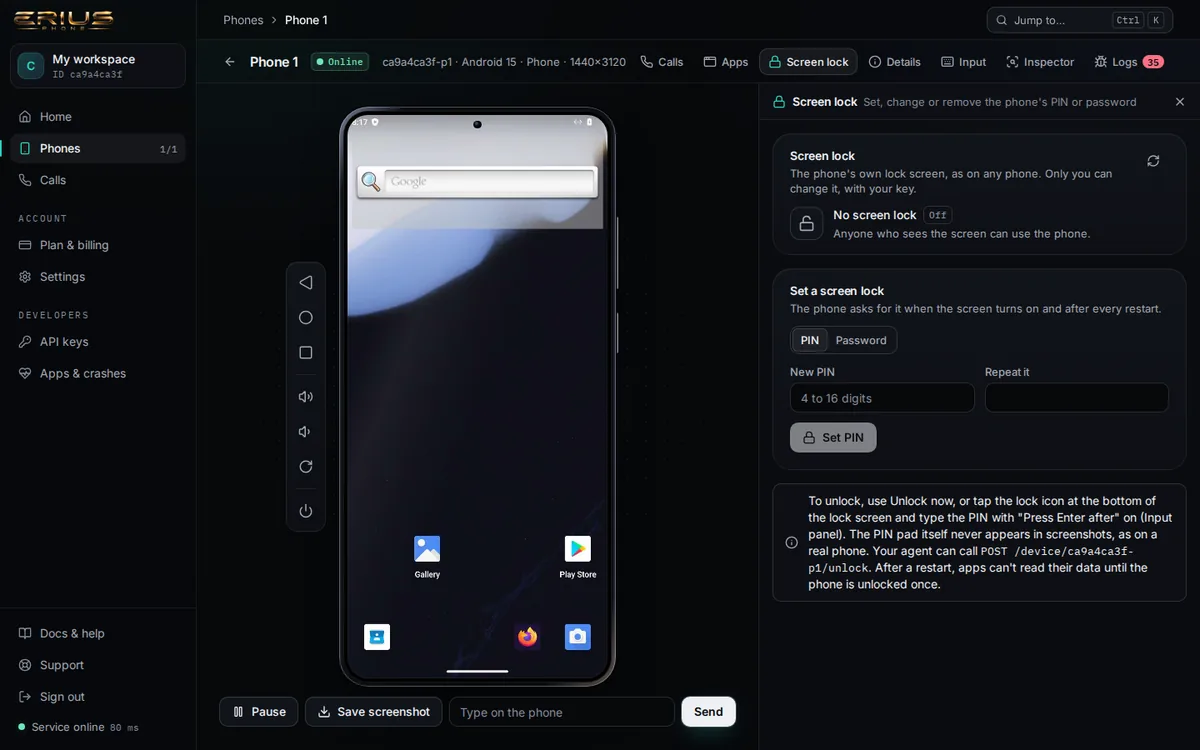
curl -s -H "X-API-Key: $ERIUS_KEY" $ERIUS_API/device/$ERIUS_DEVICE/screen-lock{
"device": "ca9a4ca3f-p1",
"enabled": false,
"type": "none",
"resettable": true,
"setAt": null
}Set a PIN:
curl -s -X POST -H "X-API-Key: $ERIUS_KEY" -H "Content-Type: application/json" \
-d '{"pin":"482913"}' $ERIUS_API/device/$ERIUS_DEVICE/screen-lock{
"ok": true,
"changed": true,
"device": "ca9a4ca3f-p1",
"enabled": true,
"type": "pin",
"resettable": true,
"setAt": "2026-10-12T20:22:31.382Z"
}Change it to a password. Because the lock was set through the API, the old value is not needed:
curl -s -X POST -H "X-API-Key: $ERIUS_KEY" -H "Content-Type: application/json" \
-d '{"password":"blue-kettle-42"}' $ERIUS_API/device/$ERIUS_DEVICE/screen-lock{
"ok": true,
"changed": true,
"device": "ca9a4ca3f-p1",
"enabled": true,
"type": "password",
"resettable": true,
"setAt": "2026-10-12T20:22:31.821Z"
}Wake the phone and unlock it:
curl -s -X POST -H "X-API-Key: $ERIUS_KEY" $ERIUS_API/device/$ERIUS_DEVICE/unlock{
"ok": true,
"unlocked": true,
"type": "password",
"alreadyUnlocked": true
}Remove the lock:
curl -s -X DELETE -H "X-API-Key: $ERIUS_KEY" $ERIUS_API/device/$ERIUS_DEVICE/screen-lock{
"ok": true,
"changed": true,
"device": "ca9a4ca3f-p1",
"enabled": false,
"type": "none",
"resettable": true,
"setAt": null
}- Forgot it? A lock that was set through the dashboard or the API can always be changed or removed with your key (
"resettable": true). A lock you set in the phone's own Settings app is not known to us: changing it needs the current value, and if you forget that we cannot recover it. - While the PIN pad is on screen, screenshots of it fail. That is Android protecting the PIN pad, as on any phone.
- We have not tested calls on a locked phone. Unlock it before you start a call.
Files
No file transfer yet.
There is no endpoint to copy a file to the phone or read one back.
curl -s -w "\nHTTP %{http_code}\n" \
-H "X-API-Key: $ERIUS_KEY" $ERIUS_API/device/$ERIUS_DEVICE/files{
"ok": false,
"error": "not_found",
"message": "no route GET /device/ca9a4ca3f-p1/files",
"requestId": "4f2c203fe4d498ff"
}
HTTP 404What you can send today: an APK (install), an audio file (microphone) and a video file (camera). Apps on the phone can download from the internet as usual, for example in Firefox. What apps store stays on the phone between sessions.
Camera and microphone
Decide what the phone sees and hears.
The phone has a virtual microphone and a virtual camera. Apps on the phone use them like real ones.
Microphone Upload an audio file (the example is an MP3). The next app that records from the microphone hears it:
curl -s -X POST -H "X-API-Key: $ERIUS_KEY" \
-F audio=@hello.mp3 "$ERIUS_API/device/$ERIUS_DEVICE/mic"{
"ok": true,
"device": "ca9a4ca3f-p1",
"format": {
"sampleRate": 48000,
"channels": 1,
"encoding": "pcm_s16le"
},
"bytes": 552960,
"durationMs": 5760,
"truncated": false,
"loop": false,
…curl -s -H "X-API-Key: $ERIUS_KEY" $ERIUS_API/device/$ERIUS_DEVICE/mic/status{
"device": "ca9a4ca3f-p1",
"state": "queued",
"playedMs": 0,
"totalMs": 5760,
"loop": false,
…Stop it. The microphone returns to silence:
curl -s -X DELETE -H "X-API-Key: $ERIUS_KEY" $ERIUS_API/device/$ERIUS_DEVICE/mic{
"ok": true,
"device": "ca9a4ca3f-p1",
"state": "idle",
"playedMs": 0,
…Camera (beta) Upload a video file. Camera apps on the phone then show that video instead of the test card:
curl -s -X POST -H "X-API-Key: $ERIUS_KEY" \
-F video=@clip.mp4 "$ERIUS_API/device/$ERIUS_DEVICE/camera"{
"ok": true,
"restarted": true,
"restartMs": 303,
"device": "ca9a4ca3f-p1",
"beta": true,
"feeding": true,
"output": {
"size": "1280x720",
"fps": 30,
"format": "MJPEG"
},
"feed": {
"bytes": 34072,
…Back to the test card:
curl -s -X DELETE -H "X-API-Key: $ERIUS_KEY" $ERIUS_API/device/$ERIUS_DEVICE/camera{
"ok": true,
"restarted": true,
"restartMs": 402,
"device": "ca9a4ca3f-p1",
"beta": true,
…During a call the microphone and camera belong to the phone's AI persona: its voice goes into the microphone and its face into the camera. Uploads made while a call is up are replaced by the persona. See Your agent's voice.
More
Everything else the phone can do.
The Device API reference lists every endpoint: reading the screen as a tree (/snapshot, /observe), tapping by label, swipes and scrolls, intents, rotation and crash logs. There is no endpoint to restart or reset a phone; if yours is stuck, see Troubleshooting.
Stuck on something?
Open a ticket from your dashboard and we answer there. No key yet? Write to info@eriusphone.com.
Open a support ticket